Home » VRRP และ HSRP: First Hop Redundancy Protocols
VRRP และ HSRP: First Hop Redundancy Protocols
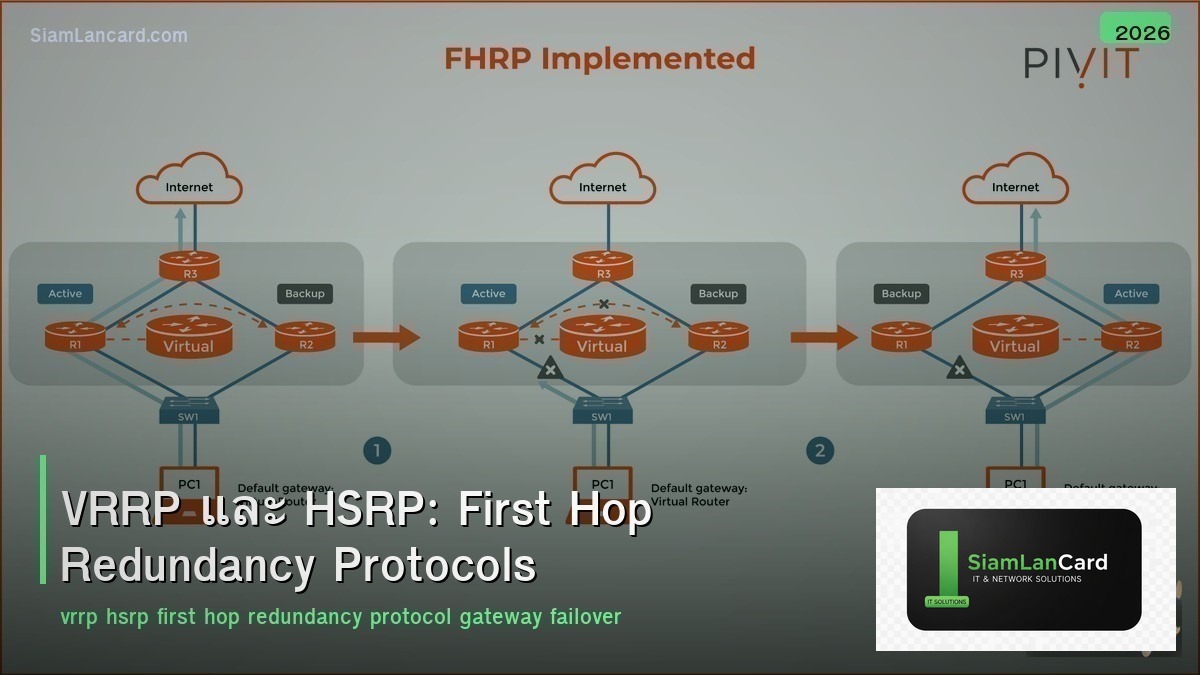
VRRP และ HSRP: First Hop Redundancy Protocols
First Hop Redundancy Protocols (FHRP) เช่น VRRP และ HSRP ช่วยให้ default gateway ของ hosts มี high availability โดยใช้ routers หลายตัวทำงานร่วมกันเป็น virtual router ที่มี virtual IP address เดียว ถ้า active router ล้ม standby router จะเข้ามาทำหน้าที่แทนโดยอัตโนมัติ โดยที่ hosts ไม่ต้องเปลี่ยน gateway
ถ้าไม่มี FHRP เมื่อ default gateway router ล้ม hosts ทุกตัวใน subnet จะออก internet ไม่ได้ จนกว่าจะ fix router หรือเปลี่ยน gateway ด้วยมือ FHRP แก้ปัญหานี้ด้วย automatic failover ใน milliseconds ถึงวินาที
HSRP vs VRRP vs GLBP
| Feature |
HSRP |
VRRP |
GLBP |
| Vendor |
Cisco proprietary |
Open standard (RFC 5798) |
Cisco proprietary |
| Version |
HSRPv1, HSRPv2 |
VRRPv2, VRRPv3 |
GLBP |
| Virtual IP |
ต้องต่างจาก physical IP |
สามารถเป็น physical IP ของ master ได้ |
ต้องต่างจาก physical IP |
| Active/Standby |
1 Active + 1 Standby + Listeners |
1 Master + Backups |
1 AVG + AVFs (load balancing) |
| Load Balancing |
ไม่มี (active-standby only) |
ไม่มี (master-backup only) |
มี (distribute traffic across AVFs) |
| Multicast |
224.0.0.2 (v1) / 224.0.0.102 (v2) |
224.0.0.18 |
224.0.0.102 |
| Priority Default |
100 (0-255) |
100 (1-254) |
100 (0-255) |
| Preemption |
Disabled by default |
Enabled by default |
Disabled by default |
| Timers |
Hello 3s, Hold 10s |
Advert 1s, Master Down 3.6s |
Hello 3s, Hold 10s |
HSRP Operation
| State |
ความหมาย |
| Initial |
เริ่มต้น ยังไม่รู้สถานะ |
| Learn |
ยังไม่รู้ virtual IP (รอเรียนรู้จาก active) |
| Listen |
รู้ virtual IP แต่ไม่ใช่ active/standby |
| Speak |
ส่ง Hello messages กำลัง elect active/standby |
| Standby |
Backup พร้อมเข้าแทน active เมื่อ fail |
| Active |
Forward traffic สำหรับ virtual IP |
VRRP Operation
| State |
ความหมาย |
| Initialize |
เริ่มต้น |
| Backup |
Monitor master ถ้า master down = transition to master |
| Master |
Forward traffic + ส่ง advertisements |
Election Process
| Step |
HSRP |
VRRP |
| 1. Priority สูงสุด |
Priority สูงสุด = Active |
Priority สูงสุด = Master |
| 2. Tie-breaker |
IP address สูงสุด |
IP address สูงสุด |
| 3. Preemption |
ต้อง enable (default off) |
Default on (preempt เสมอ) |
Tracking
| Feature |
วิธีทำงาน |
| Interface Tracking |
ถ้า tracked interface down → ลด priority (failover) |
| ตัวอย่าง |
Track uplink interface ถ้า uplink down → ลด priority → standby ขึ้นมาเป็น active |
| Decrement |
ลด priority เท่าไหร่เมื่อ tracked object down |
| Object Tracking |
Track IP route, IP SLA, interface status |
Design Considerations
| Consideration |
คำแนะนำ |
| HSRP vs VRRP |
Cisco only = HSRP, Multi-vendor = VRRP (open standard) |
| Preemption |
Enable preemption + preempt delay (ป้องกัน flapping) |
| Timer tuning |
ลด timers สำหรับ faster failover (e.g., hello 1s, hold 3s) |
| Authentication |
ใช้ MD5 authentication (ป้องกัน rogue routers) |
| Track uplink |
Track uplink interface/route เพื่อ failover เมื่อ uplink down |
| Multiple groups |
ใช้ 2 HSRP groups สำหรับ load sharing (group 1 active R1, group 2 active R2) |
| BFD |
ใช้ BFD (Bidirectional Forwarding Detection) สำหรับ sub-second failover |
Load Sharing with Multiple Groups
| VLAN |
HSRP Group |
Active Router |
Standby Router |
| VLAN 10 |
Group 10 |
R1 (priority 110) |
R2 (priority 100) |
| VLAN 20 |
Group 20 |
R2 (priority 110) |
R1 (priority 100) |
ผลลัพธ์: VLAN 10 traffic ผ่าน R1, VLAN 20 traffic ผ่าน R2 = load sharing
VRRPv3 (RFC 5798)
| Feature |
VRRPv2 |
VRRPv3 |
| IPv6 Support |
ไม่มี |
มี (IPv4 + IPv6) |
| Sub-second timers |
ไม่มี (minimum 1s) |
มี (centisecond resolution) |
| VRRPv2 compat |
– |
ไม่ backward compatible |
ทิ้งท้าย: FHRP = Gateway High Availability
FHRP (HSRP/VRRP) ให้ gateway redundancy สำหรับ hosts HSRP = Cisco proprietary, VRRP = open standard Priority สูง = active/master, preemption ควร enable Track uplink interface เพื่อ failover เมื่อ upstream down ใช้ multiple groups สำหรับ load sharing ระหว่าง routers
อ่านเพิ่มเติมเกี่ยวกับ OSPF Design และ Network Load Balancing ที่ siamlancard.com หรือจาก icafeforex.com และ siam2r.com






