
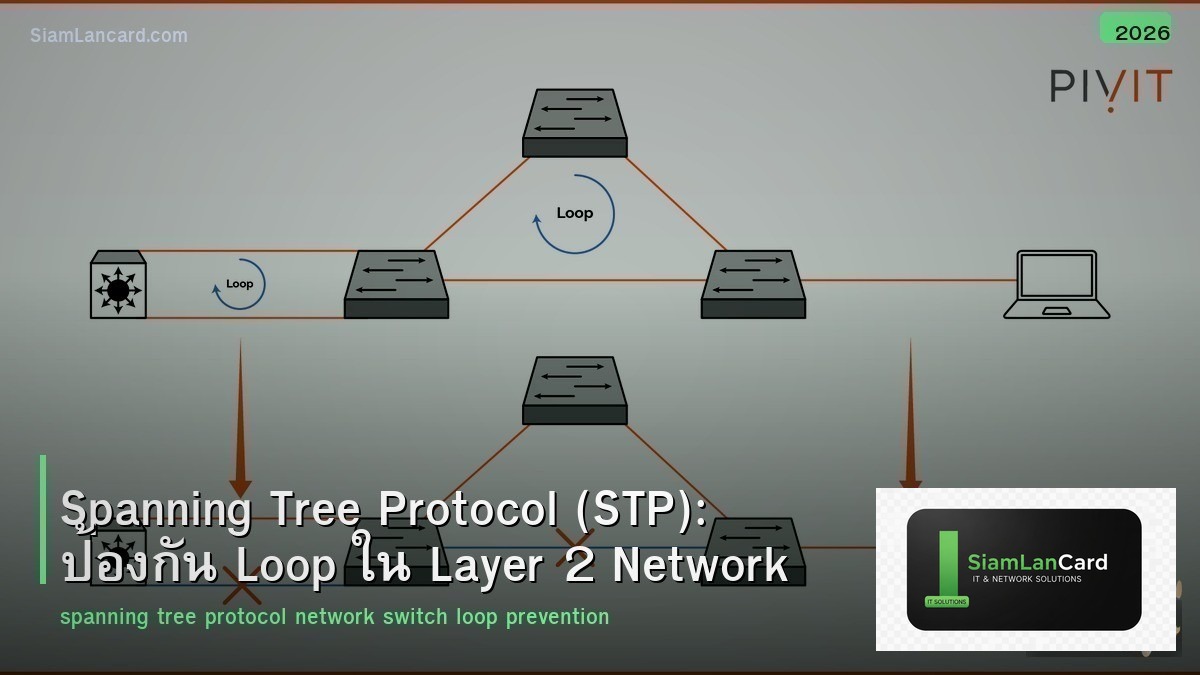
Spanning Tree Protocol (STP): ป้องกัน Loop ใน Layer 2 Network
STP (Spanning Tree Protocol, IEEE 802.1D) เป็น protocol ที่ป้องกัน Layer 2 loops ใน switched network โดยการ block redundant paths ให้เหลือเพียง active topology เดียวที่ไม่มี loop ถ้าไม่มี STP redundant links จะทำให้เกิด broadcast storm ที่ทำให้ network ล่มทั้งหมดภายในวินาที
Layer 2 loop เป็นปัญหาที่ ร้ายแรงที่สุด ใน switched network เพราะ broadcast frame ถูก forward ไปทุก port ถ้ามี loop frame จะวนซ้ำไปเรื่อยๆ ไม่มี TTL เหมือน IP packets ทำให้ switch CPU 100%, MAC table flapping, และ network ล่มทั้งหมด STP แก้ปัญหานี้ บทความนี้จะอธิบาย STP variants และ best practices
STP Variants
| Protocol | Standard | Convergence | VLAN Support | สถานะ |
|---|---|---|---|---|
| STP | 802.1D | 30-50 วินาที | 1 instance ทุก VLAN | Legacy (ไม่แนะนำ) |
| RSTP | 802.1w | 1-6 วินาที | 1 instance ทุก VLAN | ดีกว่า STP |
| PVST+ | Cisco proprietary | 30-50 วินาที | 1 instance ต่อ VLAN | Cisco legacy |
| Rapid PVST+ | Cisco proprietary | 1-6 วินาที | 1 instance ต่อ VLAN | แนะนำ (Cisco) |
| MST | 802.1s | 1-6 วินาที | หลาย VLANs ต่อ instance | แนะนำ (multi-vendor) |
STP ทำงานอย่างไร
5 ขั้นตอน
1. เลือก Root Bridge: Switch ที่มี Bridge ID ต่ำที่สุด = Root Bridge Bridge ID = Priority (default 32768) + MAC Address ทุก traffic ไหลผ่าน Root Bridge 2. เลือก Root Port: แต่ละ non-root switch เลือก port ที่มี cost ต่ำที่สุดไป Root Bridge 3. เลือก Designated Port: แต่ละ segment เลือก port ที่ forward traffic (จาก switch ที่ใกล้ Root ที่สุด) 4. Block ports ที่เหลือ: Ports ที่ไม่ใช่ Root Port หรือ Designated Port จะถูก block 5. Topology เสถียร: ไม่มี loop, traffic ไหลผ่าน active topology
Port States
| State (STP) | State (RSTP) | ทำอะไร | ระยะเวลา |
|---|---|---|---|
| Blocking | Discarding | ไม่ forward frames, รับ BPDUs | 20 วินาที (max age) |
| Listening | Discarding | ส่ง/รับ BPDUs, ไม่ forward | 15 วินาที (forward delay) |
| Learning | Learning | เรียนรู้ MAC addresses, ไม่ forward | 15 วินาที (forward delay) |
| Forwarding | Forwarding | Forward frames ปกติ | – |
Root Bridge Selection
ต้อง Design ไม่ใช่ปล่อยให้เลือกเอง
ปัญหา: ถ้าไม่กำหนด priority switch ที่มี MAC ต่ำสุดจะเป็น Root Bridge ซึ่งอาจเป็น access switch ตัวเล็กๆ แทนที่จะเป็น core switch วิธีแก้: กำหนด priority ให้ core switch: spanning-tree vlan 1-4094 root primary (บน core switch หลัก) spanning-tree vlan 1-4094 root secondary (บน core switch สำรอง) หรือกำหนด priority ตรงๆ: spanning-tree vlan 1-4094 priority 4096 (primary) spanning-tree vlan 1-4094 priority 8192 (secondary)
STP Protection Features
| Feature | ป้องกันอะไร | ใช้ที่ไหน |
|---|---|---|
| PortFast | ลด convergence time สำหรับ access ports (skip listening/learning) | Access ports (PC, printer) |
| BPDU Guard | Block port ถ้าได้รับ BPDU (ป้องกัน rogue switch) | Access ports ที่เปิด PortFast |
| Root Guard | ป้องกัน port จากการเป็น root port (ป้องกัน rogue root bridge) | Ports ที่เชื่อมต่อ downstream switches |
| Loop Guard | ป้องกัน blocked port จากการเปลี่ยนเป็น forwarding เมื่อไม่ได้รับ BPDUs | Redundant links |
| BPDU Filter | หยุดส่ง/รับ BPDUs บน port | ใช้ระวัง (อาจทำให้เกิด loop) |
Configuration Best Practices
Cisco IOS
Global: spanning-tree mode rapid-pvst spanning-tree extend system-id spanning-tree vlan 1-4094 priority 4096
Access Ports: interface range GigabitEthernet0/1-48 spanning-tree portfast spanning-tree bpduguard enable
Uplink/Trunk Ports: interface GigabitEthernet0/49 spanning-tree guard root
Global PortFast default (ใช้กับทุก access port): spanning-tree portfast default spanning-tree portfast bpduguard default
RSTP vs STP Convergence
| เหตุการณ์ | STP (802.1D) | RSTP (802.1w) |
|---|---|---|
| Link failure | 30-50 วินาที | < 6 วินาที (มักน้อยกว่า 1 วินาที) |
| Root bridge failure | 50+ วินาที | < 6 วินาที |
| New switch added | 30 วินาที (listening + learning) | < 1 วินาที (proposal/agreement) |
Troubleshooting
| ปัญหา | อาการ | วิธีแก้ |
|---|---|---|
| Root Bridge ผิดตัว | Traffic path ไม่ optimal | ตรวจ show spanning-tree root, กำหนด priority |
| BPDU Guard err-disable | Port down, err-disabled | ตรวจว่ามี switch/hub ต่อที่ access port, clear errdisable |
| Broadcast storm | CPU 100%, network ช้ามาก | ตรวจ STP topology, หา loop (unmanaged switch) |
| Slow convergence | Network down 30-50 วินาที | เปลี่ยนเป็น Rapid PVST+ หรือ MST |
ทิ้งท้าย: STP ต้อง Design ไม่ใช่ปล่อยให้ทำงานเอง
STP ป้องกัน Layer 2 loops ที่ทำให้ network ล่ม ใช้ Rapid PVST+ หรือ MST แทน legacy STP กำหนด Root Bridge (อย่าปล่อยให้เลือกเอง) เปิด PortFast + BPDU Guard บนทุก access port เปิด Root Guard บน downstream ports
อ่านเพิ่มเติมเกี่ยวกับ DHCP Snooping ARP Inspection และ Network Segmentation VLAN ที่ siamlancard.com หรือจาก icafeforex.com และ siam2r.com






