
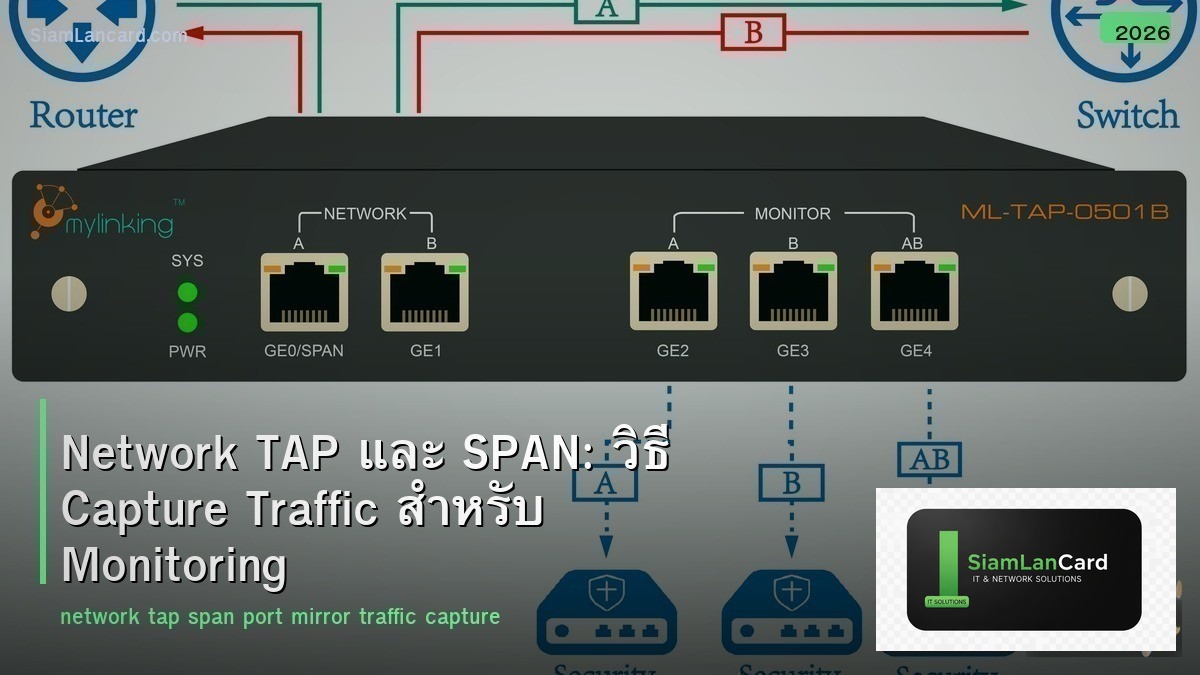
Network TAP และ SPAN: วิธี Capture Traffic สำหรับ Monitoring
Network TAP (Test Access Point) และ SPAN (Switched Port Analyzer) เป็น 2 วิธีหลักในการ capture network traffic สำหรับ monitoring, security analysis และ troubleshooting ทั้งคู่ทำให้เราเห็น traffic ที่วิ่งอยู่ใน network โดยไม่กระทบ production traffic
การ capture traffic จำเป็นสำหรับ IDS/IPS (Intrusion Detection/Prevention), network forensics, performance monitoring, compliance auditing และ troubleshooting ที่ต้องดู packet-level detail บทความนี้จะอธิบายความแตกต่างระหว่าง TAP และ SPAN ข้อดีข้อเสีย และวิธีเลือกใช้
SPAN (Port Mirroring)
วิธีทำงาน
SPAN เป็น feature ของ managed switch ที่ copy traffic จาก source port(s) หรือ VLAN ไปยัง destination port (monitor port) อุปกรณ์ monitoring (IDS, Wireshark, packet broker) เชื่อมต่อกับ destination port เพื่อรับ copy ของ traffic configure บน switch (Cisco): monitor session 1 source interface Gi0/1 monitor session 1 destination interface Gi0/24
ประเภท SPAN
| ประเภท | คำอธิบาย | ข้อจำกัด |
|---|---|---|
| Local SPAN | Source และ destination อยู่บน switch เดียวกัน | จำกัดจำนวน sessions |
| RSPAN (Remote SPAN) | Source และ destination อยู่คนละ switch (ส่งผ่าน RSPAN VLAN) | เพิ่ม traffic บน trunk links |
| ERSPAN (Encapsulated) | ส่ง mirrored traffic ผ่าน GRE tunnel ข้าม L3 network | เพิ่ม overhead (GRE encapsulation) |
ข้อจำกัดของ SPAN
Packet drops: ถ้า traffic volume สูงเกินความสามารถของ destination port switch จะ drop packets ที่ mirror ใช้ CPU ของ switch (อาจ impact performance) จำนวน SPAN sessions จำกัด (ส่วนใหญ่ 2-4 sessions ต่อ switch) ไม่เห็น physical layer errors (CRC errors, runts) อาจ modify timestamps
Network TAP
วิธีทำงาน
Network TAP เป็นอุปกรณ์ hardware ที่ติดตั้งระหว่าง 2 อุปกรณ์ (เช่น switch ↔ router) TAP copy traffic ทั้ง 2 ทิศทาง (TX และ RX) ออกมาทาง monitor ports เป็น passive device ไม่ใช้ไฟ (สำหรับ copper passive TAP) หรือใช้ไฟแต่ไม่ impact traffic (active TAP) traffic ยังวิ่งผ่านได้ปกติแม้ TAP ไม่มีไฟ (fail-open)
ประเภท TAP
| ประเภท | Media | จุดเด่น | ข้อจำกัด |
|---|---|---|---|
| Passive Copper TAP | Copper (RJ45) | ไม่ใช้ไฟ fail-open | จำกัด speed (100M-1G) |
| Active Copper TAP | Copper (RJ45) | รองรับ 10G+ regenerate signal | ใช้ไฟ (มี fail-open bypass) |
| Fiber TAP | Fiber Optic | Split light ไม่ impact signal | ลด signal strength (split ratio) |
| Aggregation TAP | ทั้งคู่ | รวม TX+RX เป็น 1 output | อาจ drop ถ้า aggregate > output speed |
TAP vs SPAN เปรียบเทียบ
| คุณสมบัติ | SPAN | TAP |
|---|---|---|
| ค่าใช้จ่าย | ฟรี (feature ของ switch) | ต้องซื้ออุปกรณ์ ($200-$5,000+) |
| Packet Loss | อาจ drop ถ้า oversubscribed | ไม่ drop (100% traffic copy) |
| Impact Production | ใช้ CPU switch เล็กน้อย | ไม่ impact เลย |
| Physical Errors | ไม่เห็น | เห็น (CRC errors, runts) |
| Deployment | Config บน switch (ไม่ต้อง downtime) | ต้องเสียบ inline (อาจต้อง downtime) |
| Fail Mode | ไม่มี impact (ลบ config ออก) | Fail-open (traffic ยังผ่าน) |
| Scalability | จำกัด sessions | 1 TAP ต่อ 1 link |
| เหมาะกับ | Troubleshooting ชั่วคราว, SMB | Production monitoring ถาวร, security |
Packet Broker
เมื่อต้องการมากกว่า TAP/SPAN
Network Packet Broker (NPB) เป็นอุปกรณ์ที่รับ traffic จาก TAPs/SPANs หลายจุด แล้ว aggregate, filter, load-balance ส่งไปยัง monitoring tools ข้อดี: filter เฉพาะ traffic ที่ต้องการ (ลด load บน monitoring tools) load-balance traffic ไป tools หลายตัว deduplicate packets (traffic ที่ mirror มาซ้ำ) vendors: Gigamon, Keysight (Ixia), cPacket, Profitap
Use Cases
Security Monitoring (IDS/IPS)
IDS (Snort, Suricata, Zeek) ต้องเห็น network traffic เพื่อตรวจจับ threats ใช้ TAP หรือ SPAN ส่ง traffic ไป IDS TAP ดีกว่าสำหรับ production (ไม่ drop packets) SPAN พอสำหรับ low-traffic environments
Network Forensics
บันทึก full packet capture สำหรับ forensics analysis เมื่อเกิด security incident ใช้ TAP + packet capture appliance (Arkime/Moloch, NetworkMiner) เก็บ traffic ย้อนหลัง 7-30 วัน (ต้องการ storage มาก)
Performance Monitoring
วิเคราะห์ application performance (response time, throughput, errors) ใช้ TAP/SPAN + NPM tools (PRTG, SolarWinds NPM, ntopng) เห็น traffic patterns, bandwidth usage, top talkers
ทิ้งท้าย: เห็น Traffic = เห็นปัญหา
“คุณไม่สามารถ secure หรือ optimize สิ่งที่คุณมองไม่เห็น” TAP และ SPAN ทำให้เห็น traffic ในnetwork ใช้ SPAN สำหรับ troubleshooting ชั่วคราว ใช้ TAP สำหรับ production monitoring ถาวร ทุกองค์กรควรมี visibility ใน network traffic
อ่านเพิ่มเติมเกี่ยวกับ Network Troubleshooting และ Firewall Rules ที่ siamlancard.com หรือจาก icafeforex.com และ siam2r.com






