
Network Design: ออกแบบ Campus Network สำหรับองค์กร 500 คน
Campus Network Design คือการออกแบบระบบ network สำหรับอาคารหรือกลุ่มอาคารขององค์กร ครอบคลุมตั้งแต่ access layer (ที่ users เชื่อมต่อ) ไปจนถึง core layer (backbone) รวมถึง WiFi, security, WAN connectivity การออกแบบที่ดีทำให้ network reliable, scalable, secure และ manageable
บทความนี้จะ ออกแบบ campus network สำหรับองค์กร 500 คน ตั้งแต่เลือก topology, อุปกรณ์, IP addressing, VLAN, WiFi, security จนถึง redundancy เป็น reference design ที่นำไปปรับใช้ได้จริง
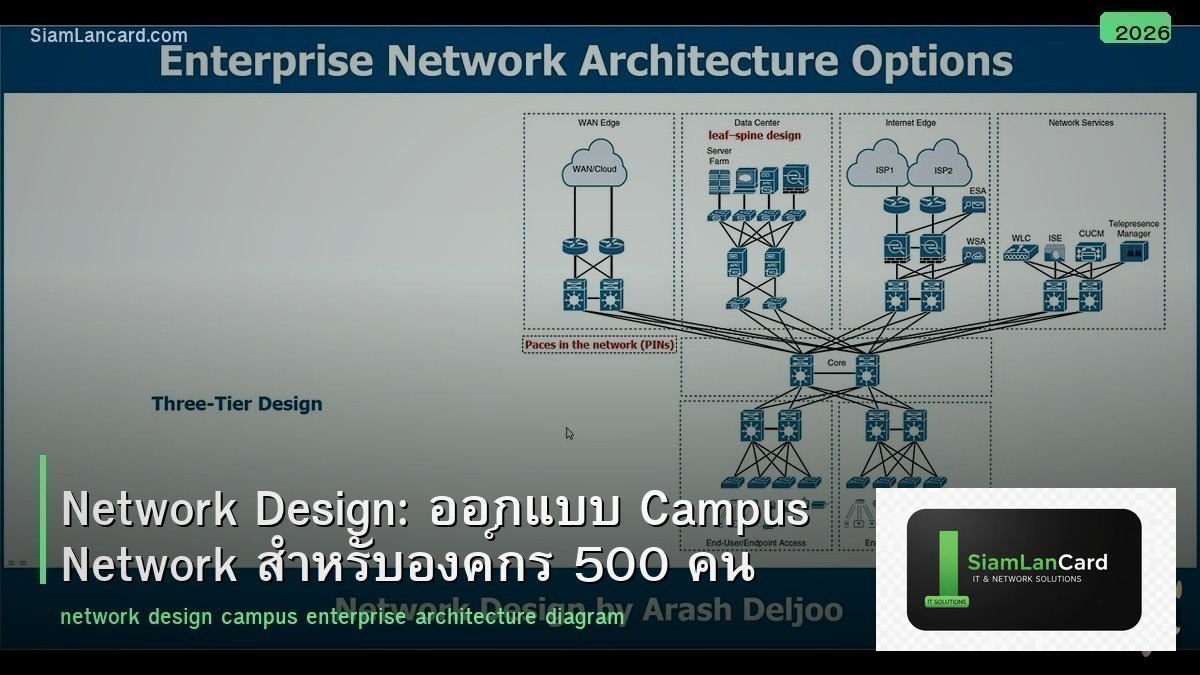
Three-Tier Architecture
Cisco Hierarchical Model
| Layer | หน้าที่ | อุปกรณ์ |
|---|---|---|
| Core Layer | High-speed backbone เชื่อมต่อ distribution switches | L3 switch 10G/40G (redundant pair) |
| Distribution Layer | Routing ระหว่าง VLANs, policy enforcement, ACL | L3 switch 10G uplink |
| Access Layer | เชื่อมต่อ end devices (PCs, phones, APs, printers) | L2 PoE+ switch 1G/2.5G |
สำหรับองค์กร 500 คน อาจใช้ Collapsed Core (รวม Core + Distribution เป็น layer เดียว) เพื่อลดค่าใช้จ่ายและความซับซ้อน ใช้ L3 switch คู่เป็น core/distribution + L2 PoE switches เป็น access layer
VLAN Design
| VLAN ID | ชื่อ | Subnet | อุปกรณ์ |
|---|---|---|---|
| 10 | Management | 10.0.10.0/24 | Switch mgmt, AP mgmt, server iLO/iDRAC |
| 20 | Servers | 10.0.20.0/24 | File server, AD, DNS, DHCP, App servers |
| 30 | Staff Wired | 10.0.30.0/22 | Staff PCs (1022 hosts) |
| 40 | Staff WiFi | 10.0.40.0/22 | Staff laptops, mobile (WiFi) |
| 50 | VoIP | 10.0.50.0/24 | IP phones |
| 60 | Printers/IoT | 10.0.60.0/24 | Printers, scanners, IoT devices |
| 70 | Guest WiFi | 10.0.70.0/24 | Guest devices (isolated) |
| 80 | Security | 10.0.80.0/24 | IP cameras, access control |
| 99 | Native/Unused | 10.0.99.0/24 | Trunk native VLAN (unused ports) |
IP Addressing
Addressing Scheme
10.0.0.0/16 สำหรับทั้งองค์กร แบ่งตาม VLAN Gateway: .1 ของแต่ละ subnet (บน core/distribution L3 switch) DHCP: centralized DHCP server (10.0.20.x) + DHCP relay บน L3 switch DNS: internal DNS server (10.0.20.x) + forward to public DNS Static IPs: .2-.50 ของแต่ละ subnet (servers, printers, network equipment)
WiFi Design
AP Placement
สำหรับ 500 คน ในอาคารสำนักงาน: ประมาณ 25-30 WiFi APs (1 AP ต่อ 15-20 users หรือ 1 AP ต่อ 150-200 ตร.ม.) ใช้ WiFi 6 (802.11ax) APs เป็นอย่างน้อย WiFi 6E/7 ถ้างบอนุญาต ใช้ controller-based (Cisco, Aruba, Ubiquiti) หรือ cloud-managed (Meraki, Ubiquiti Cloud) channel planning: ใช้ 1, 6, 11 สำหรับ 2.4 GHz ใช้ non-overlapping channels สำหรับ 5 GHz
SSID Design
| SSID | Auth | VLAN | สำหรับ |
|---|---|---|---|
| Corp-WiFi | WPA3-Enterprise (RADIUS) | VLAN 40 | Staff |
| Guest-WiFi | Captive Portal | VLAN 70 | Guests (isolated) |
Security Design
Firewall
Next-Generation Firewall (NGFW) ที่ perimeter: Fortinet FortiGate หรือ Palo Alto (enterprise), pfSense (SMB) Inter-VLAN firewall rules: Staff → Servers: Allow specific services Guest → Internet: Allow HTTP/HTTPS only Guest → Internal: Deny all Management → All: Allow (restricted IPs)
Access Control
802.1X สำหรับ wired access (RADIUS + AD integration) WPA3-Enterprise สำหรับ WiFi (RADIUS + AD) Unused switch ports: shutdown + assign to unused VLAN MAC address filtering สำหรับ printers/IoT (MAB)
Redundancy
High Availability
Core/Distribution: 2 × L3 switches (VRRP/HSRP สำหรับ gateway redundancy) uplinks: dual 10G จาก access switch ไป core switches 2 ตัว (port-channel/LACP) Internet: dual ISP links (active-passive หรือ load-balance) Power: UPS สำหรับ network equipment ทุกตัว PoE switches: ถ้า switch ตาย AP/phone/camera ดับ → พิจารณา redundant switches สำหรับ critical areas
Bill of Materials (ตัวอย่าง)
| อุปกรณ์ | จำนวน | หน้าที่ |
|---|---|---|
| Core/Distribution L3 Switch (48p 10G) | 2 | Routing, gateway, redundancy |
| Access L2 PoE+ Switch (48p 1G) | 12-15 | User access, APs, cameras |
| WiFi 6 APs | 25-30 | Wireless access |
| WiFi Controller (หรือ cloud license) | 1 | AP management |
| NGFW Firewall | 1-2 | Perimeter security |
| Server (AD, DNS, DHCP, RADIUS, NMS) | 2 | Infrastructure services |
| UPS | 2-4 | Power protection |
| Rack (42U) | 1-2 | Equipment housing |
| Patch Panels + Cable Management | ตามจำนวน ports | Structured cabling |
Implementation Phases
Phased Approach
Phase 1: Core infrastructure (core switches, firewall, cabling, server room) Phase 2: Access layer (access switches, patch panels, cable runs) Phase 3: WiFi (AP deployment, controller, RADIUS) Phase 4: Security (802.1X, firewall rules, VLAN ACLs) Phase 5: Monitoring (NMS, SNMP, logging) Phase 6: Documentation (network diagram, IP plan, credentials, procedures)
ทิ้งท้าย: ออกแบบดีตั้งแต่แรก ดีกว่าแก้ทีหลัง
Campus Network Design ที่ดีต้องคิดล่วงหน้า: VLAN segmentation, IP planning, WiFi coverage, security, redundancy, scalability ลงทุนเวลาออกแบบตอนต้น ดีกว่าแก้ปัญหาทีหลัง (re-IP, re-cable, add VLANs) design document เป็นสิ่งสำคัญที่สุด ทุกคนในทีมต้องเข้าถึงได้
อ่านเพิ่มเติมเกี่ยวกับ Network Segmentation VLAN และ IPAM IP Address Management ที่ siamlancard.com หรือจาก icafeforex.com และ siam2r.com





