
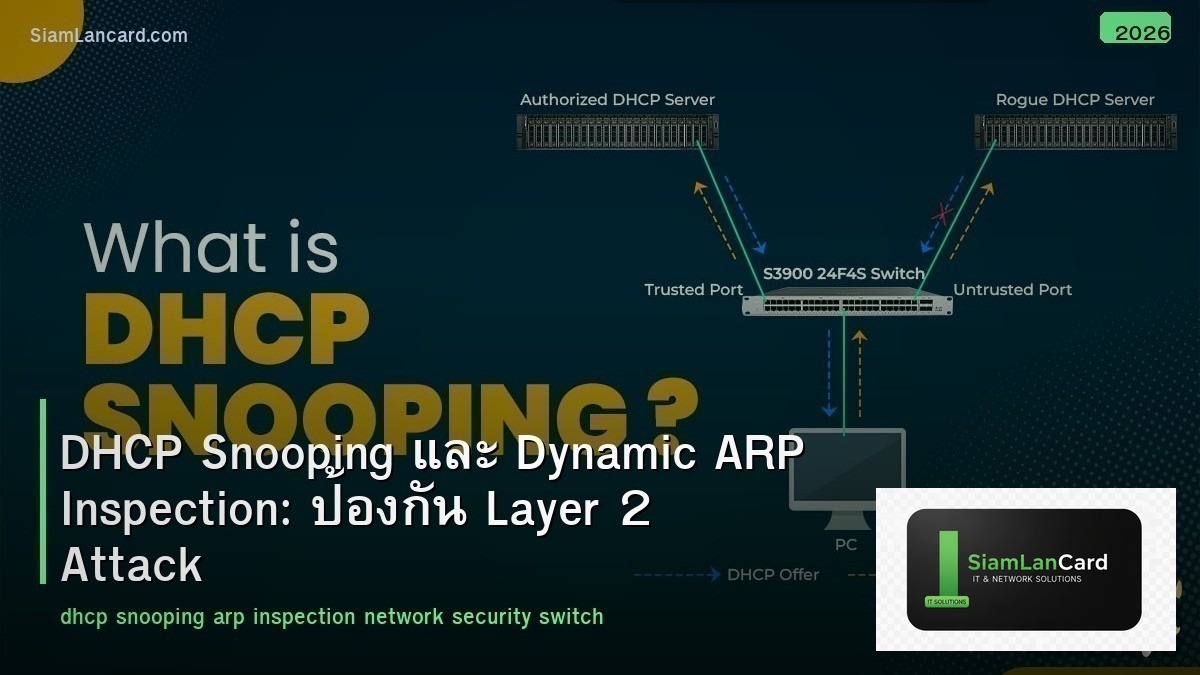
DHCP Snooping และ Dynamic ARP Inspection: ป้องกัน Layer 2 Attack
DHCP Snooping และ Dynamic ARP Inspection (DAI) เป็น Layer 2 security features บน managed switches ที่ป้องกัน attacks ที่พบบ่อยในองค์กร ได้แก่ DHCP Spoofing (Rogue DHCP Server) และ ARP Spoofing (ARP Poisoning) ซึ่ง attacker สามารถ intercept traffic หรือทำ Man-in-the-Middle attack ได้
หลายองค์กร ไม่ได้เปิด DHCP Snooping และ DAI เพราะไม่รู้ว่ามี feature นี้ หรือกลัวว่าจะทำให้ network มีปัญหา จริงๆ แล้ว features เหล่านี้ config ไม่ยากและเป็น security พื้นฐานที่ทุก enterprise network ควรมี บทความนี้จะอธิบายทั้ง 2 features พร้อม config ตัวอย่าง
DHCP Spoofing Attack
วิธีโจมตี
Attacker ตั้ง Rogue DHCP Server บน network: Client ส่ง DHCP Discover (broadcast) Rogue DHCP Server ตอบ DHCP Offer ก่อน legitimate DHCP Server Client ได้ IP address จาก Rogue Server พร้อม: Default Gateway = Attacker’s IP (traffic ผ่าน attacker) DNS Server = Attacker’s DNS (redirect ไป phishing sites) Attacker เห็น traffic ทั้งหมด (Man-in-the-Middle)
DHCP Snooping
วิธีทำงาน
DHCP Snooping แบ่ง ports เป็น 2 ประเภท: Trusted Ports: ports ที่เชื่อมต่อกับ legitimate DHCP Server (uplink ไป server) อนุญาต DHCP Server messages (Offer, ACK) Untrusted Ports: ports ที่เชื่อมต่อกับ clients (access ports) block DHCP Server messages (ถ้ามี DHCP Offer จาก untrusted port = drop) อนุญาตเฉพาะ DHCP Client messages (Discover, Request)
DHCP Snooping Binding Table
DHCP Snooping สร้าง binding table ที่เก็บข้อมูล: MAC Address + IP Address + VLAN + Port + Lease Time ของทุก client ที่ได้ IP จาก DHCP binding table นี้ถูกใช้โดย DAI และ IP Source Guard เพื่อ verify traffic
DHCP Snooping Configuration
Cisco IOS
Enable DHCP Snooping: ip dhcp snooping ip dhcp snooping vlan 10,20,30 no ip dhcp snooping information option (ถ้า DHCP Server ไม่รองรับ option 82) Trust uplink port (ไป DHCP Server): interface GigabitEthernet0/1 ip dhcp snooping trust Untrusted ports (access ports) = default ไม่ต้อง config เพิ่ม Rate limit (ป้องกัน DHCP starvation attack): interface range GigabitEthernet0/2-48 ip dhcp snooping limit rate 15
ARP Spoofing Attack
วิธีโจมตี
Attacker ส่ง Gratuitous ARP (unsolicited ARP replies): Attacker ส่ง ARP reply: “IP 10.0.1.1 (gateway) = MAC AA:BB:CC:DD:EE:FF (attacker’s MAC)” Victims update ARP table: gateway IP maps to attacker’s MAC ทุก traffic ที่ victims ส่งไป gateway จะไปที่ attacker แทน Attacker forward traffic ไป real gateway (victims ไม่รู้ตัว) = Man-in-the-Middle
Dynamic ARP Inspection (DAI)
วิธีทำงาน
DAI ใช้ DHCP Snooping binding table เพื่อ verify ARP packets: เมื่อ switch ได้รับ ARP packet บน untrusted port ตรวจสอบว่า source MAC + source IP ใน ARP packet match กับ DHCP Snooping binding table ถ้า match = forward ถ้าไม่ match = drop (potential ARP spoofing) Trusted ports (uplinks) ไม่ถูก inspect
DAI Configuration
Cisco IOS
Enable DAI (ต้องเปิด DHCP Snooping ก่อน): ip arp inspection vlan 10,20,30 Trust uplink ports: interface GigabitEthernet0/1 ip arp inspection trust Rate limit (ป้องกัน ARP flooding): interface range GigabitEthernet0/2-48 ip arp inspection limit rate 15 Validate (เพิ่มการตรวจสอบ): ip arp inspection validate src-mac dst-mac ip
IP Source Guard
เพิ่ม Layer อีกชั้น
IP Source Guard ใช้ DHCP Snooping binding table เพื่อ filter IP traffic: ตรวจสอบว่า source IP + source MAC ใน IP packets match กับ binding table ป้องกัน IP address spoofing (ใช้ IP ของคนอื่น) ทำงานร่วมกับ DHCP Snooping + DAI เป็น defense-in-depth
Config: interface range GigabitEthernet0/2-48 ip verify source
ข้อควรระวัง
| ปัญหา | สาเหตุ | วิธีแก้ |
|---|---|---|
| Devices ที่ใช้ static IP ถูก block | ไม่มีใน DHCP Snooping binding table | เพิ่ม static binding หรือ ARP ACL |
| Option 82 ทำให้ DHCP ไม่ทำงาน | DHCP Server ไม่รองรับ option 82 | ปิด option 82: no ip dhcp snooping information option |
| ARP rate limit เกิน → port ถูก err-disable | Rate limit ต่ำเกินไป | เพิ่ม rate limit หรือ disable err-disable recovery |
| VoIP phones ไม่ได้ IP | Trust ไม่ครบ ports | Trust port ที่เชื่อมต่อ DHCP relay/server |
Static Binding สำหรับ Static IP Devices
Devices ที่ไม่ใช้ DHCP
Servers, printers, network devices ที่ใช้ static IP ต้องเพิ่ม static binding: ip dhcp snooping binding 0011.2233.4455 vlan 10 10.0.10.50 interface GigabitEthernet0/10 expiry infinite หรือใช้ ARP ACL สำหรับ DAI: arp access-list STATIC-ARP permit ip host 10.0.10.50 mac host 0011.2233.4455 ip arp inspection filter STATIC-ARP vlan 10
Defense-in-Depth Stack
| Feature | ป้องกัน | ใช้ Binding Table |
|---|---|---|
| DHCP Snooping | Rogue DHCP Server | สร้าง binding table |
| Dynamic ARP Inspection | ARP Spoofing/Poisoning | ใช้ binding table |
| IP Source Guard | IP Address Spoofing | ใช้ binding table |
| 802.1X / MAB | Unauthorized device access | ใช้ร่วมกับ RADIUS |
| Port Security | MAC flooding | จำกัด MAC per port |
ทิ้งท้าย: DHCP Snooping + DAI คือ L2 Security พื้นฐาน
DHCP Snooping + DAI ป้องกัน DHCP Spoofing และ ARP Spoofing ซึ่งเป็น attacks ที่พบบ่อย config ไม่ยาก เริ่มจาก DHCP Snooping แล้วเพิ่ม DAI อย่าลืม trust uplink ports และเพิ่ม static binding สำหรับ static IP devices test ใน lab ก่อน deploy production
อ่านเพิ่มเติมเกี่ยวกับ RADIUS Authentication 802.1X และ Network Access Control NAC ที่ siamlancard.com หรือจาก icafeforex.com และ siam2r.com






